



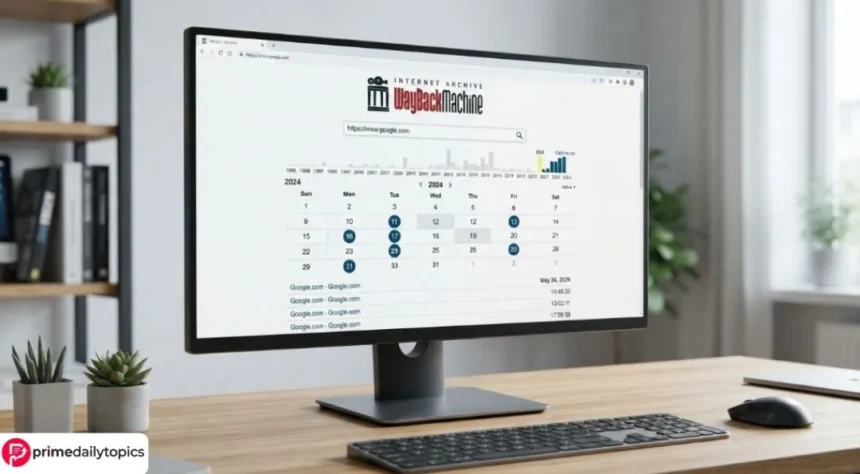
The Wayback Machine is a free web archive operated by the Internet Archive, a US nonprofit organization. It allows users to view captured versions of websites from different dates and save public pages for future reference. As a result, researchers, journalists, website owners, students, and everyday readers can examine how online content has changed over time.
However, the Wayback Machine does not preserve every website or every element on an archived page. Some captures contain missing images, broken links, or features that no longer work. Therefore, users should understand both the tool’s capabilities and its limitations before treating an archived page as complete evidence.
What is the Wayback Machine?
The Wayback Machine stores historical captures of publicly accessible web pages. According to its official search page, the archive now covers more than one trillion web pages.
A capture represents what the archiving system retrieved at a particular time. For example, a company’s homepage might have captures from several dates in the same year. Each version may show different products, prices, employees, policies, or design elements.
Consequently, the service can help users:
- Recover information from deleted pages
- Examine an old version of a website
- Track changes to public statements or policies
- Find references from discontinued websites
- Verify when specific material appeared online
- Create durable links for research and citations
- Review a website after its domain changes ownership
Nevertheless, a capture proves only what the archive retrieved at that moment. It does not necessarily prove who wrote the page, whether its claims were accurate, or how long the content remained online.
How to search the Wayback Machine
First, open the Wayback Machine. Then, enter the complete domain or page URL in the search field.
For the best results, use the exact address of the page you want to find. Searching for a homepage may not automatically reveal every archived article on that domain.
If the archive has captures, it will display a timeline and calendar. Years with saved material appear in the timeline, while colored circles mark capture dates on the calendar.
Next, select a year and click a highlighted date. The Wayback Machine may show more than one capture for that day, so choose the relevant timestamp.
The archived URL includes a date code in this format:
YYYYMMDDHHMMSS
Therefore, a code beginning with 20240115 indicates a capture from January 15, 2024. The remaining numbers show the hour, minute, and second.
What the calendar colors mean
The calendar uses different colors to show the response that the crawler received:
- Blue usually represents a successful response.
- Green indicates a redirect.
- Orange represents a client-side error, such as a missing page.
- Red indicates a server error.
In most cases, blue captures provide the most useful results. However, an error capture can still help researchers establish that a page returned a specific status on a particular date.
Moreover, several circles on one date may represent separate captures rather than duplicate entries. The page could have changed between those timestamps.
How to save a page with Save Page Now
The Wayback Machine does not require users to wait for an automatic crawl. Instead, its Save Page Now feature lets anyone request a capture of a public page.
To use it:
- Copy the full URL of the page.
- Open the Wayback Machine homepage.
- Find the Save Page Now section.
- Paste the URL into the field.
- Submit the request.
- Keep the resulting archived URL.
The Internet Archive’s official saving guide explains that Save Page Now captures one page at a time. It does not automatically archive an entire website, directory, or every link on the submitted page.
Furthermore, saving a page once does not enroll it in future crawls. If the content changes, users must request another capture or rely on later automated crawls.
The feature usually attempts to preserve the submitted page along with images and style files. However, the website’s configuration may prevent the archive from collecting every resource.

Why archived pages sometimes look broken
Modern websites often rely on JavaScript, external services, databases, video players, and content that loads only after a user takes an action. These features can make accurate preservation difficult.
For example, an archived page may show:
- Missing images
- Blank video players
- Menus that do not open
- Forms that cannot submit information
- Links that jump to a different capture date
- Content from the live website
- An incomplete page layout
The Wayback Machine may not have captured every image, script, or linked page during the same crawl. In addition, an interactive feature may need to contact the original website’s server. Once that server changes or disappears, the archived feature can stop working.
Therefore, users should inspect the timestamp in the archived URL while moving between pages. The archive may use the closest available capture when it lacks the requested page from the selected date.
Why a website may not appear in the archive
A missing result does not prove that a website never existed. Instead, several factors may explain the absence.
The Internet Archive’s Wayback Machine help documentation identifies common reasons, including:
- The crawler did not discover the page.
- The website required a password.
- The server blocked automated access.
- The page had no public links leading to it.
- Robots instructions restricted crawling.
- The site owner requested an exclusion.
- Technical settings prevented a successful capture.
- JavaScript concealed links from the crawler.
Similarly, a website may appear in the archive while a specific article does not. Automated crawlers cannot always find pages that require internal searches, form submissions, or account access.
Can the Wayback Machine recover a complete website?
Not reliably. The archive may help a website owner locate old text, images, or page layouts, but it does not operate as a guaranteed backup service.
A complete backup normally includes databases, original media files, themes, plugins, configuration settings, and private administrative information. In contrast, the Wayback Machine records public-facing web material that its crawlers can reach.
Therefore, website owners should maintain independent backups through their hosting provider or another secure storage system. They should not rely on public web captures as their only recovery method.
Can archived pages serve as evidence?
Researchers and journalists often use Wayback Machine URLs to document changes in public web content. Additionally, the Internet Archive accepts requests for certified records and affidavits in some legal matters.
However, legal admissibility depends on the jurisdiction, purpose, and authentication requirements. A screenshot alone may not provide enough context because users can crop it or omit the archived URL and timestamp.
For careful documentation, record:
- The original page URL
- The complete archived URL
- The capture date and time
- The date you accessed the archive
- The relevant text or image
- Any missing or broken elements
- Other evidence that supports the same finding
Moreover, consult a qualified lawyer before relying on an archived page in litigation or another formal proceeding.
Does the Wayback Machine remove pages?
The Internet Archive reviews requests to exclude archived material. Its help documentation asks requesters to identify the relevant URLs, the time period they want excluded, and evidence showing when they controlled the site or account.
However, submitting a request does not guarantee removal. The Internet Archive reviews each case and considers the available information.
Privacy, copyright, harassment, and ownership issues can involve different procedures. Therefore, requesters should explain the problem clearly and provide accurate supporting details.
Frequently asked questions
Is the Wayback Machine free?
Yes. Anyone can search public captures and use Save Page Now without paying a browsing fee. The Internet Archive also offers separate services for organizations with larger preservation needs.
Can I search an old website without knowing its URL?
The Wayback Machine offers limited site-name and keyword discovery. However, it does not provide a universal full-text search across every archived page. An exact domain or page URL usually produces better results.
Does Save Page Now archive an entire website?
No. It normally saves only the submitted page and the resources required to display it. It does not automatically crawl every internal link or preserve the entire domain.
Can I remove my website from the Wayback Machine?
You can submit an exclusion request to the Internet Archive. However, the organization reviews requests individually and does not promise a particular outcome in advance.
Why does an archived link open the live website?
The archive may lack the linked page for the selected date. In that case, it may use another available capture or connect to the live resource. Always check the timestamp and domain in the address bar.
Is a Wayback Machine capture always accurate?
No. A capture may omit images, scripts, videos, styles, or dynamically generated material. Therefore, users should preserve the full archived URL, document visible limitations, and confirm important findings with additional evidence.
Read More Prime Daily Topics
